My Store
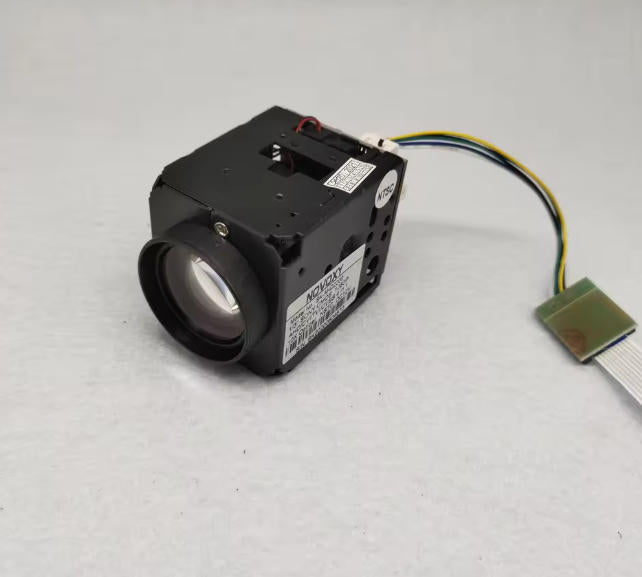
NOVOXY SK-AHD2200 1/3" IMX323 CMOS 1200TVL 1080P AHD HD 10x Optical ICR CCTV Security Zoom Camera Module 5~50mm Lens
NOVOXY SK-AHD2200 1/3" IMX323 CMOS 1200TVL 1080P AHD HD 10x Optical ICR CCTV Security Zoom Camera Module 5~50mm Lens
Couldn't load pickup availability
Free shipping 1/3" IMX323 CMOS 1200TVL 1080P AHD HD 10x Optical ICR CCTV Security Speed Dome Mini Zoom Camera Module 5~50mm Lens
Note:
The camera is 4 in1 signal and can switch signals freely. Please select the default signal output you want correctly
CVBS signal can directly to connect with diplay or monitor, Other signal can not direct to connect with display or mintor, Unless your monitor support AHD/TVI/CVI signal input
-
High Resolution10x Auto Focus
-
10x Optical zoom with IR sensor: f=5~50mm
-
Day&Night Function
-
Auto Focus
Specifications
-
Pickup Device: 1/3" IMX323 CMOS
-
Power Supply: DC12V +/-10%, 3.6W
-
Sync Mode: NTSC 60Hz/PAL 50Hz, Internal Sync
-
Horizontal Resolution: 1200TVL/1080P 2MP
-
Mini. Illumination: 0.05Lux/F1.2 (Color mode), 0.001Lux/F1.2 (B/W), S/N ratio >60dB(enhanced)
-
Video Output: 1.0vp-p 75 ohm
-
S/N Ratio: >48db
-
Focal Length: 5~50mm
-
Lens Zoom: 10x Optical Zoom
-
Focus Control : Auto/Manual/Key Auto
-
Iris control: Auto
-
On-screen Menu: Address Code, Gain Control, Electronic Shutter, BLC (Backlight Compensation), Focus Control
-
Electronic Shutter: 1/50-1/100000sec
-
White Balance Control: Built-in (On/Off)
-
Operation Temperature: -10~ 50C degrees
-
Operation humidity: 0~96%
-
-
Package list:
-
1xpcs 10x zoom camera module
-

-

-


How to switch the different signal:
Step 1: Press "MENU" button to enter into menu and select "NEXT" as shown below,press "MENU" button enter into submenu

Step 2: select "EXPOSURE", Press right botton(NEAR) 3 times and press the "MENU"button to enter the HIDDEN menu

Step 3: Enter the HIDDEN menu, then you can press left or right botton to select different signal output , (CHD is CVI, THD is TVI)


Step 4: After select the signal output, press "MENU" botton , then select the " APPLY" and press "MENU" botton to save the setting

Step 5: Exit and save it, it will be success to siwtch different signal output